Compare commits
3 Commits
devin/1750
...
lg-mcp-cre
| Author | SHA1 | Date | |
|---|---|---|---|

|
4a7c21f0e7 | ||
|
|
060c486948 | ||
|
|
8b176d0598 |
@@ -285,32 +285,25 @@ Watch this video tutorial for a step-by-step demonstration of deploying your cre
|
||||
|
||||
### 11. API Keys
|
||||
|
||||
When running ```crewai create crew``` command, the CLI will show you a list of available LLM providers to choose from, followed by model selection for your chosen provider.
|
||||
When running ```crewai create crew``` command, the CLI will first show you the top 5 most common LLM providers and ask you to select one.
|
||||
|
||||
Once you've selected an LLM provider and model, you will be prompted for API keys.
|
||||
Once you've selected an LLM provider, you will be prompted for API keys.
|
||||
|
||||
#### Available LLM Providers
|
||||
#### Initial API key providers
|
||||
|
||||
The CLI will show you the following LLM providers to choose from:
|
||||
The CLI will initially prompt for API keys for the following services:
|
||||
|
||||
* OpenAI
|
||||
* Groq
|
||||
* Anthropic
|
||||
* Google Gemini
|
||||
* NVIDIA NIM
|
||||
* Groq
|
||||
* Hugging Face
|
||||
* Ollama
|
||||
* Watson
|
||||
* AWS Bedrock
|
||||
* Azure
|
||||
* Cerebras
|
||||
* SambaNova
|
||||
|
||||
When you select a provider, the CLI will then show you available models for that provider and prompt you to enter your API key.
|
||||
When you select a provider, the CLI will prompt you to enter your API key.
|
||||
|
||||
#### Other Options
|
||||
|
||||
If you select "other", you will be able to select from a list of LiteLLM supported providers.
|
||||
If you select option 6, you will be able to select from a list of LiteLLM supported providers.
|
||||
|
||||
When you select a provider, the CLI will prompt you to enter the Key name and the API key.
|
||||
|
||||
|
||||
BIN
docs/images/crewai_traces.gif
Normal file

|
After Width: | Height: | Size: 10 MiB |
BIN
docs/images/maxim_agent_tracking.png
Normal file

|
After Width: | Height: | Size: 1.3 MiB |
BIN
docs/images/maxim_alerts_1.png
Normal file

|
After Width: | Height: | Size: 1.1 MiB |
BIN
docs/images/maxim_dashboard_1.png
Normal file

|
After Width: | Height: | Size: 617 KiB |
BIN
docs/images/maxim_playground.png
Normal file

|
After Width: | Height: | Size: 1.2 MiB |
BIN
docs/images/maxim_trace_eval.png
Normal file

|
After Width: | Height: | Size: 845 KiB |
BIN
docs/images/maxim_versions.png
Normal file

|
After Width: | Height: | Size: 1.3 MiB |
@@ -6,11 +6,11 @@ icon: plug
|
||||
|
||||
## Overview
|
||||
|
||||
The [Model Context Protocol](https://modelcontextprotocol.io/introduction) (MCP) provides a standardized way for AI agents to provide context to LLMs by communicating with external services, known as MCP Servers.
|
||||
The `crewai-tools` library extends CrewAI's capabilities by allowing you to seamlessly integrate tools from these MCP servers into your agents.
|
||||
This gives your crews access to a vast ecosystem of functionalities.
|
||||
The [Model Context Protocol](https://modelcontextprotocol.io/introduction) (MCP) provides a standardized way for AI agents to provide context to LLMs by communicating with external services, known as MCP Servers.
|
||||
The `crewai-tools` library extends CrewAI's capabilities by allowing you to seamlessly integrate tools from these MCP servers into your agents.
|
||||
This gives your crews access to a vast ecosystem of functionalities.
|
||||
|
||||
We currently support the following transport mechanisms:
|
||||
We currently support the following transport mechanisms:
|
||||
|
||||
- **Stdio**: for local servers (communication via standard input/output between processes on the same machine)
|
||||
- **Server-Sent Events (SSE)**: for remote servers (unidirectional, real-time data streaming from server to client over HTTP)
|
||||
@@ -52,27 +52,27 @@ from mcp import StdioServerParameters # For Stdio Server
|
||||
# Example server_params (choose one based on your server type):
|
||||
# 1. Stdio Server:
|
||||
server_params=StdioServerParameters(
|
||||
command="python3",
|
||||
command="python3",
|
||||
args=["servers/your_server.py"],
|
||||
env={"UV_PYTHON": "3.12", **os.environ},
|
||||
)
|
||||
|
||||
# 2. SSE Server:
|
||||
server_params = {
|
||||
"url": "http://localhost:8000/sse",
|
||||
"url": "http://localhost:8000/sse",
|
||||
"transport": "sse"
|
||||
}
|
||||
|
||||
# 3. Streamable HTTP Server:
|
||||
server_params = {
|
||||
"url": "http://localhost:8001/mcp",
|
||||
"url": "http://localhost:8001/mcp",
|
||||
"transport": "streamable-http"
|
||||
}
|
||||
|
||||
# Example usage (uncomment and adapt once server_params is set):
|
||||
with MCPServerAdapter(server_params) as mcp_tools:
|
||||
print(f"Available tools: {[tool.name for tool in mcp_tools]}")
|
||||
|
||||
|
||||
my_agent = Agent(
|
||||
role="MCP Tool User",
|
||||
goal="Utilize tools from an MCP server.",
|
||||
@@ -101,44 +101,79 @@ with MCPServerAdapter(server_params) as mcp_tools:
|
||||
)
|
||||
# ... rest of your crew setup ...
|
||||
```
|
||||
|
||||
## Using with CrewBase
|
||||
|
||||
To use MCPServer tools within a CrewBase class, use the `mcp_tools` method. Server configurations should be provided via the mcp_server_params attribute. You can pass either a single configuration or a list of multiple server configurations.
|
||||
|
||||
```python
|
||||
@CrewBase
|
||||
class CrewWithMCP:
|
||||
# ... define your agents and tasks config file ...
|
||||
|
||||
mcp_server_params = [
|
||||
# Streamable HTTP Server
|
||||
{
|
||||
"url": "http://localhost:8001/mcp",
|
||||
"transport": "streamable-http"
|
||||
},
|
||||
# SSE Server
|
||||
{
|
||||
"url": "http://localhost:8000/sse",
|
||||
"transport": "sse"
|
||||
},
|
||||
# StdIO Server
|
||||
StdioServerParameters(
|
||||
command="python3",
|
||||
args=["servers/your_stdio_server.py"],
|
||||
env={"UV_PYTHON": "3.12", **os.environ},
|
||||
)
|
||||
]
|
||||
|
||||
@agent
|
||||
def your_agent(self):
|
||||
return Agent(config=self.agents_config["your_agent"], tools=self.get_mcp_tools()) # you can filter which tool are available also
|
||||
|
||||
# ... rest of your crew setup ...
|
||||
```
|
||||
## Explore MCP Integrations
|
||||
|
||||
<CardGroup cols={2}>
|
||||
<Card
|
||||
title="Stdio Transport"
|
||||
icon="server"
|
||||
<Card
|
||||
title="Stdio Transport"
|
||||
icon="server"
|
||||
href="/mcp/stdio"
|
||||
color="#3B82F6"
|
||||
>
|
||||
Connect to local MCP servers via standard input/output. Ideal for scripts and local executables.
|
||||
</Card>
|
||||
<Card
|
||||
title="SSE Transport"
|
||||
icon="wifi"
|
||||
<Card
|
||||
title="SSE Transport"
|
||||
icon="wifi"
|
||||
href="/mcp/sse"
|
||||
color="#10B981"
|
||||
>
|
||||
Integrate with remote MCP servers using Server-Sent Events for real-time data streaming.
|
||||
</Card>
|
||||
<Card
|
||||
title="Streamable HTTP Transport"
|
||||
icon="globe"
|
||||
<Card
|
||||
title="Streamable HTTP Transport"
|
||||
icon="globe"
|
||||
href="/mcp/streamable-http"
|
||||
color="#F59E0B"
|
||||
>
|
||||
Utilize flexible Streamable HTTP for robust communication with remote MCP servers.
|
||||
</Card>
|
||||
<Card
|
||||
title="Connecting to Multiple Servers"
|
||||
icon="layer-group"
|
||||
<Card
|
||||
title="Connecting to Multiple Servers"
|
||||
icon="layer-group"
|
||||
href="/mcp/multiple-servers"
|
||||
color="#8B5CF6"
|
||||
>
|
||||
Aggregate tools from several MCP servers simultaneously using a single adapter.
|
||||
</Card>
|
||||
<Card
|
||||
title="Security Considerations"
|
||||
icon="lock"
|
||||
<Card
|
||||
title="Security Considerations"
|
||||
icon="lock"
|
||||
href="/mcp/security"
|
||||
color="#EF4444"
|
||||
>
|
||||
@@ -148,7 +183,7 @@ with MCPServerAdapter(server_params) as mcp_tools:
|
||||
|
||||
Checkout this repository for full demos and examples of MCP integration with CrewAI! 👇
|
||||
|
||||
<Card
|
||||
<Card
|
||||
title="GitHub Repository"
|
||||
icon="github"
|
||||
href="https://github.com/tonykipkemboi/crewai-mcp-demo"
|
||||
@@ -163,7 +198,7 @@ Always ensure that you trust an MCP Server before using it.
|
||||
</Warning>
|
||||
|
||||
#### Security Warning: DNS Rebinding Attacks
|
||||
SSE transports can be vulnerable to DNS rebinding attacks if not properly secured.
|
||||
SSE transports can be vulnerable to DNS rebinding attacks if not properly secured.
|
||||
To prevent this:
|
||||
|
||||
1. **Always validate Origin headers** on incoming SSE connections to ensure they come from expected sources
|
||||
@@ -175,6 +210,6 @@ Without these protections, attackers could use DNS rebinding to interact with lo
|
||||
For more details, see the [Anthropic's MCP Transport Security docs](https://modelcontextprotocol.io/docs/concepts/transports#security-considerations).
|
||||
|
||||
### Limitations
|
||||
* **Supported Primitives**: Currently, `MCPServerAdapter` primarily supports adapting MCP `tools`.
|
||||
* **Supported Primitives**: Currently, `MCPServerAdapter` primarily supports adapting MCP `tools`.
|
||||
Other MCP primitives like `prompts` or `resources` are not directly integrated as CrewAI components through this adapter at this time.
|
||||
* **Output Handling**: The adapter typically processes the primary text output from an MCP tool (e.g., `.content[0].text`). Complex or multi-modal outputs might require custom handling if not fitting this pattern.
|
||||
|
||||
@@ -1,28 +1,107 @@
|
||||
---
|
||||
title: Maxim Integration
|
||||
description: Start Agent monitoring, evaluation, and observability
|
||||
icon: bars-staggered
|
||||
title: "Maxim Integration"
|
||||
description: "Start Agent monitoring, evaluation, and observability"
|
||||
icon: "infinity"
|
||||
---
|
||||
|
||||
# Maxim Integration
|
||||
# Maxim Overview
|
||||
|
||||
Maxim AI provides comprehensive agent monitoring, evaluation, and observability for your CrewAI applications. With Maxim's one-line integration, you can easily trace and analyse agent interactions, performance metrics, and more.
|
||||
|
||||
## Features
|
||||
|
||||
## Features: One Line Integration
|
||||
### Prompt Management
|
||||
|
||||
- **End-to-End Agent Tracing**: Monitor the complete lifecycle of your agents
|
||||
- **Performance Analytics**: Track latency, tokens consumed, and costs
|
||||
- **Hyperparameter Monitoring**: View the configuration details of your agent runs
|
||||
- **Tool Call Tracking**: Observe when and how agents use their tools
|
||||
- **Advanced Visualisation**: Understand agent trajectories through intuitive dashboards
|
||||
Maxim's Prompt Management capabilities enable you to create, organize, and optimize prompts for your CrewAI agents. Rather than hardcoding instructions, leverage Maxim’s SDK to dynamically retrieve and apply version-controlled prompts.
|
||||
|
||||
<Tabs>
|
||||
<Tab title="Prompt Playground">
|
||||
Create, refine, experiment and deploy your prompts via the playground. Organize of your prompts using folders and versions, experimenting with the real world cases by linking tools and context, and deploying based on custom logic.
|
||||
|
||||
Easily experiment across models by [**configuring models**](https://www.getmaxim.ai/docs/introduction/quickstart/setting-up-workspace#add-model-api-keys) and selecting the relevant model from the dropdown at the top of the prompt playground.
|
||||
|
||||
<img src='https://raw.githubusercontent.com/akmadan/crewAI/docs_maxim_observability/docs/images/maxim_playground.png'> </img>
|
||||
</Tab>
|
||||
<Tab title="Prompt Versions">
|
||||
As teams build their AI applications, a big part of experimentation is iterating on the prompt structure. In order to collaborate effectively and organize your changes clearly, Maxim allows prompt versioning and comparison runs across versions.
|
||||
|
||||
<img src='https://raw.githubusercontent.com/akmadan/crewAI/docs_maxim_observability/docs/images/maxim_versions.png'> </img>
|
||||
</Tab>
|
||||
<Tab title="Prompt Comparisons">
|
||||
Iterating on Prompts as you evolve your AI application would need experiments across models, prompt structures, etc. In order to compare versions and make informed decisions about changes, the comparison playground allows a side by side view of results.
|
||||
|
||||
## **Why use Prompt comparison?**
|
||||
|
||||
Prompt comparison combines multiple single Prompts into one view, enabling a streamlined approach for various workflows:
|
||||
|
||||
1. **Model comparison**: Evaluate the performance of different models on the same Prompt.
|
||||
2. **Prompt optimization**: Compare different versions of a Prompt to identify the most effective formulation.
|
||||
3. **Cross-Model consistency**: Ensure consistent outputs across various models for the same Prompt.
|
||||
4. **Performance benchmarking**: Analyze metrics like latency, cost, and token count across different models and Prompts.
|
||||
</Tab>
|
||||
</Tabs>
|
||||
|
||||
### Observability & Evals
|
||||
|
||||
Maxim AI provides comprehensive observability & evaluation for your CrewAI agents, helping you understand exactly what's happening during each execution.
|
||||
|
||||
<Tabs>
|
||||
<Tab title="Agent Tracing">
|
||||
Track your agent’s complete lifecycle, including tool calls, agent trajectories, and decision flows effortlessly.
|
||||
|
||||
<img src='https://raw.githubusercontent.com/akmadan/crewAI/docs_maxim_observability/docs/images/maxim_agent_tracking.png'> </img>
|
||||
</Tab>
|
||||
<Tab title="Analytics + Evals">
|
||||
Run detailed evaluations on full traces or individual nodes with support for:
|
||||
|
||||
- Multi-step interactions and granular trace analysis
|
||||
- Session Level Evaluations
|
||||
- Simulations for real-world testing
|
||||
|
||||
<img src='https://raw.githubusercontent.com/akmadan/crewAI/docs_maxim_observability/docs/images/maxim_trace_eval.png'> </img>
|
||||
|
||||
<CardGroup cols={3}>
|
||||
<Card title="Auto Evals on Logs" icon="e" href="https://www.getmaxim.ai/docs/observe/how-to/evaluate-logs/auto-evaluation">
|
||||
<p>
|
||||
Evaluate captured logs automatically from the UI based on filters and sampling
|
||||
|
||||
</p>
|
||||
</Card>
|
||||
<Card title="Human Evals on Logs" icon="hand" href="https://www.getmaxim.ai/docs/observe/how-to/evaluate-logs/human-evaluation">
|
||||
<p>
|
||||
Use human evaluation or rating to assess the quality of your logs and evaluate them.
|
||||
|
||||
</p>
|
||||
</Card>
|
||||
<Card title="Node Level Evals" icon="road" href="https://www.getmaxim.ai/docs/observe/how-to/evaluate-logs/node-level-evaluation">
|
||||
<p>
|
||||
Evaluate any component of your trace or log to gain insights into your agent’s behavior.
|
||||
|
||||
</p>
|
||||
</Card>
|
||||
</CardGroup>
|
||||
---
|
||||
</Tab>
|
||||
<Tab title="Alerting">
|
||||
Set thresholds on **error**, **cost, token usage, user feedback, latency** and get real-time alerts via Slack or PagerDuty.
|
||||
|
||||
<img src='https://raw.githubusercontent.com/akmadan/crewAI/docs_maxim_observability/docs/images/maxim_alerts_1.png'> </img>
|
||||
</Tab>
|
||||
<Tab title="Dashboards">
|
||||
Visualize Traces over time, usage metrics, latency & error rates with ease.
|
||||
|
||||
<img src='https://raw.githubusercontent.com/akmadan/crewAI/docs_maxim_observability/docs/images/maxim_dashboard_1.png'> </img>
|
||||
</Tab>
|
||||
</Tabs>
|
||||
|
||||
## Getting Started
|
||||
|
||||
### Prerequisites
|
||||
|
||||
- Python version >=3.10
|
||||
|
||||
- Python version \>=3.10
|
||||
- A Maxim account ([sign up here](https://getmaxim.ai/))
|
||||
- Generate Maxim API Key
|
||||
- A CrewAI project
|
||||
|
||||
### Installation
|
||||
@@ -30,16 +109,14 @@ Maxim AI provides comprehensive agent monitoring, evaluation, and observability
|
||||
Install the Maxim SDK via pip:
|
||||
|
||||
```python
|
||||
pip install maxim-py>=3.6.2
|
||||
pip install maxim-py
|
||||
```
|
||||
|
||||
Or add it to your `requirements.txt`:
|
||||
|
||||
```
|
||||
maxim-py>=3.6.2
|
||||
maxim-py
|
||||
```
|
||||
|
||||
|
||||
### Basic Setup
|
||||
|
||||
### 1. Set up environment variables
|
||||
@@ -64,18 +141,15 @@ from maxim.logger.crewai import instrument_crewai
|
||||
|
||||
### 3. Initialise Maxim with your API key
|
||||
|
||||
```python
|
||||
# Initialize Maxim logger
|
||||
logger = Maxim().logger()
|
||||
|
||||
```python {8}
|
||||
# Instrument CrewAI with just one line
|
||||
instrument_crewai(logger)
|
||||
instrument_crewai(Maxim().logger())
|
||||
```
|
||||
|
||||
### 4. Create and run your CrewAI application as usual
|
||||
|
||||
```python
|
||||
|
||||
# Create your agent
|
||||
researcher = Agent(
|
||||
role='Senior Research Analyst',
|
||||
@@ -105,7 +179,8 @@ finally:
|
||||
maxim.cleanup() # Ensure cleanup happens even if errors occur
|
||||
```
|
||||
|
||||
That's it! All your CrewAI agent interactions will now be logged and available in your Maxim dashboard.
|
||||
|
||||
That's it\! All your CrewAI agent interactions will now be logged and available in your Maxim dashboard.
|
||||
|
||||
Check this Google Colab Notebook for a quick reference - [Notebook](https://colab.research.google.com/drive/1ZKIZWsmgQQ46n8TH9zLsT1negKkJA6K8?usp=sharing)
|
||||
|
||||
@@ -113,40 +188,44 @@ Check this Google Colab Notebook for a quick reference - [Notebook](https://cola
|
||||
|
||||
After running your CrewAI application:
|
||||
|
||||
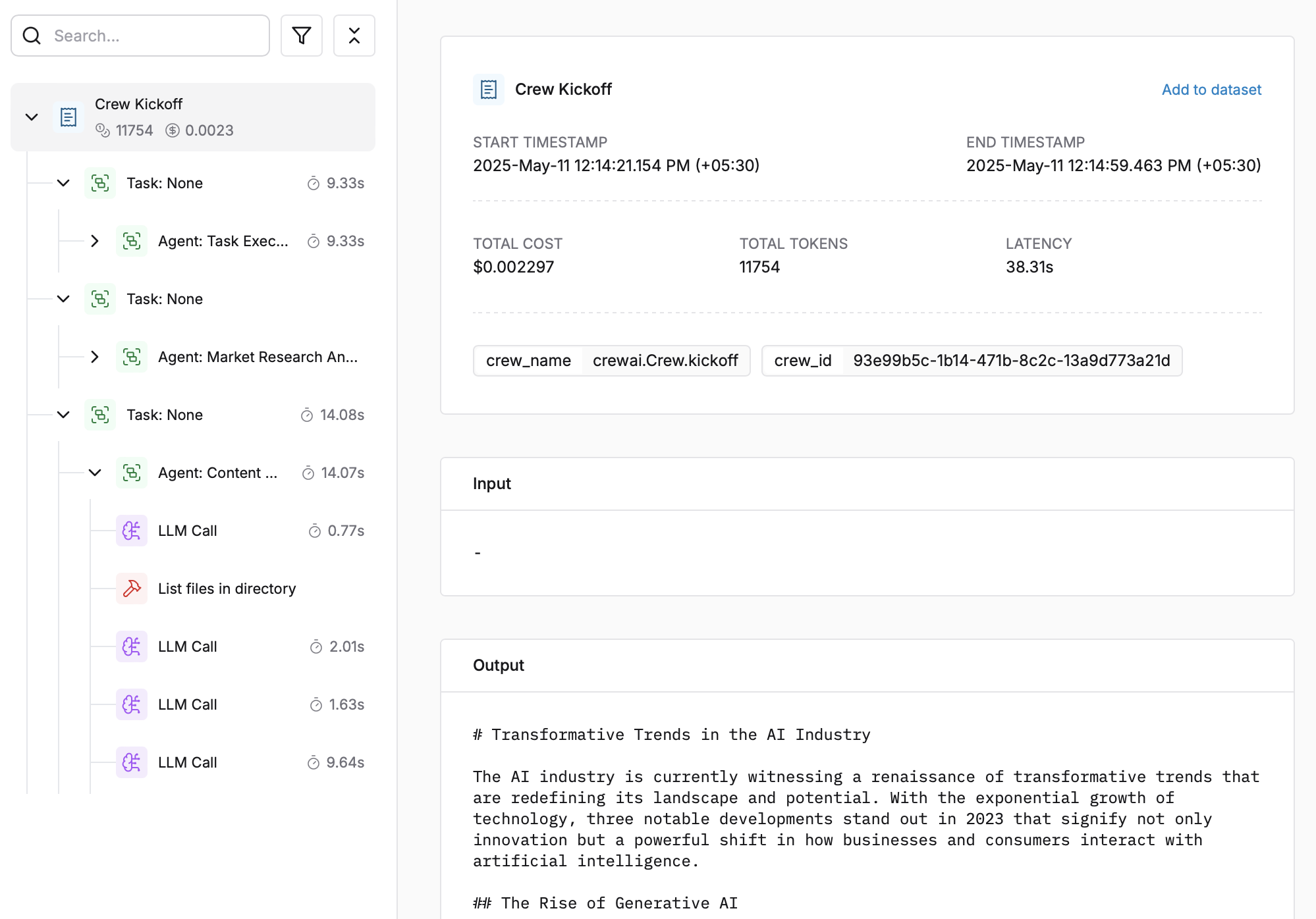
|
||||
|
||||
1. Log in to your [Maxim Dashboard](https://getmaxim.ai/dashboard)
|
||||
1. Log in to your [Maxim Dashboard](https://app.getmaxim.ai/login)
|
||||
2. Navigate to your repository
|
||||
3. View detailed agent traces, including:
|
||||
- Agent conversations
|
||||
- Tool usage patterns
|
||||
- Performance metrics
|
||||
- Cost analytics
|
||||
- Agent conversations
|
||||
- Tool usage patterns
|
||||
- Performance metrics
|
||||
- Cost analytics
|
||||
|
||||
<img src='https://raw.githubusercontent.com/akmadan/crewAI/docs_maxim_observability/docs/images/crewai_traces.gif'> </img>
|
||||
|
||||
## Troubleshooting
|
||||
|
||||
### Common Issues
|
||||
|
||||
- **No traces appearing**: Ensure your API key and repository ID are correc
|
||||
- Ensure you've **called `instrument_crewai()`** ***before*** running your crew. This initializes logging hooks correctly.
|
||||
- **No traces appearing**: Ensure your API key and repository ID are correct
|
||||
- Ensure you've **`called instrument_crewai()`** **_before_** running your crew. This initializes logging hooks correctly.
|
||||
- Set `debug=True` in your `instrument_crewai()` call to surface any internal errors:
|
||||
|
||||
```python
|
||||
instrument_crewai(logger, debug=True)
|
||||
```
|
||||
|
||||
|
||||
```python
|
||||
instrument_crewai(logger, debug=True)
|
||||
```
|
||||
- Configure your agents with `verbose=True` to capture detailed logs:
|
||||
|
||||
```python
|
||||
|
||||
agent = CrewAgent(..., verbose=True)
|
||||
```
|
||||
|
||||
|
||||
```python
|
||||
agent = CrewAgent(..., verbose=True)
|
||||
```
|
||||
- Double-check that `instrument_crewai()` is called **before** creating or executing agents. This might be obvious, but it's a common oversight.
|
||||
|
||||
### Support
|
||||
## Resources
|
||||
|
||||
If you encounter any issues:
|
||||
|
||||
- Check the [Maxim Documentation](https://getmaxim.ai/docs)
|
||||
- Maxim Github [Link](https://github.com/maximhq)
|
||||
<CardGroup cols="3">
|
||||
<Card title="CrewAI Docs" icon="book" href="https://docs.crewai.com/">
|
||||
Official CrewAI documentation
|
||||
</Card>
|
||||
<Card title="Maxim Docs" icon="book" href="https://getmaxim.ai/docs">
|
||||
Official Maxim documentation
|
||||
</Card>
|
||||
<Card title="Maxim Github" icon="github" href="https://github.com/maximhq">
|
||||
Maxim Github
|
||||
</Card>
|
||||
</CardGroup>
|
||||
@@ -94,17 +94,18 @@ def _get_project_attribute(
|
||||
|
||||
attribute = _get_nested_value(pyproject_content, keys)
|
||||
except FileNotFoundError:
|
||||
print(f"Error: {pyproject_path} not found.")
|
||||
console.print(f"Error: {pyproject_path} not found.", style="bold red")
|
||||
except KeyError:
|
||||
print(f"Error: {pyproject_path} is not a valid pyproject.toml file.")
|
||||
console.print(f"Error: {pyproject_path} is not a valid pyproject.toml file.", style="bold red")
|
||||
except tomllib.TOMLDecodeError if sys.version_info >= (3, 11) else Exception as e: # type: ignore
|
||||
print(
|
||||
console.print(
|
||||
f"Error: {pyproject_path} is not a valid TOML file."
|
||||
if sys.version_info >= (3, 11)
|
||||
else f"Error reading the pyproject.toml file: {e}"
|
||||
else f"Error reading the pyproject.toml file: {e}",
|
||||
style="bold red",
|
||||
)
|
||||
except Exception as e:
|
||||
print(f"Error reading the pyproject.toml file: {e}")
|
||||
console.print(f"Error reading the pyproject.toml file: {e}", style="bold red")
|
||||
|
||||
if require and not attribute:
|
||||
console.print(
|
||||
@@ -137,9 +138,9 @@ def fetch_and_json_env_file(env_file_path: str = ".env") -> dict:
|
||||
return env_dict
|
||||
|
||||
except FileNotFoundError:
|
||||
print(f"Error: {env_file_path} not found.")
|
||||
console.print(f"Error: {env_file_path} not found.", style="bold red")
|
||||
except Exception as e:
|
||||
print(f"Error reading the .env file: {e}")
|
||||
console.print(f"Error reading the .env file: {e}", style="bold red")
|
||||
|
||||
return {}
|
||||
|
||||
@@ -255,50 +256,69 @@ def write_env_file(folder_path, env_vars):
|
||||
|
||||
|
||||
def get_crews(crew_path: str = "crew.py", require: bool = False) -> list[Crew]:
|
||||
"""Get the crew instances from the a file."""
|
||||
"""Get the crew instances from a file."""
|
||||
crew_instances = []
|
||||
try:
|
||||
import importlib.util
|
||||
|
||||
for root, _, files in os.walk("."):
|
||||
if crew_path in files:
|
||||
crew_os_path = os.path.join(root, crew_path)
|
||||
try:
|
||||
spec = importlib.util.spec_from_file_location(
|
||||
"crew_module", crew_os_path
|
||||
)
|
||||
if not spec or not spec.loader:
|
||||
continue
|
||||
module = importlib.util.module_from_spec(spec)
|
||||
# Add the current directory to sys.path to ensure imports resolve correctly
|
||||
current_dir = os.getcwd()
|
||||
if current_dir not in sys.path:
|
||||
sys.path.insert(0, current_dir)
|
||||
|
||||
# If we're not in src directory but there's a src directory, add it to path
|
||||
src_dir = os.path.join(current_dir, "src")
|
||||
if os.path.isdir(src_dir) and src_dir not in sys.path:
|
||||
sys.path.insert(0, src_dir)
|
||||
|
||||
# Search in both current directory and src directory if it exists
|
||||
search_paths = [".", "src"] if os.path.isdir("src") else ["."]
|
||||
|
||||
for search_path in search_paths:
|
||||
for root, _, files in os.walk(search_path):
|
||||
if crew_path in files and "cli/templates" not in root:
|
||||
crew_os_path = os.path.join(root, crew_path)
|
||||
try:
|
||||
sys.modules[spec.name] = module
|
||||
spec.loader.exec_module(module)
|
||||
|
||||
for attr_name in dir(module):
|
||||
module_attr = getattr(module, attr_name)
|
||||
|
||||
try:
|
||||
crew_instances.extend(fetch_crews(module_attr))
|
||||
except Exception as e:
|
||||
print(f"Error processing attribute {attr_name}: {e}")
|
||||
continue
|
||||
|
||||
except Exception as exec_error:
|
||||
print(f"Error executing module: {exec_error}")
|
||||
import traceback
|
||||
|
||||
print(f"Traceback: {traceback.format_exc()}")
|
||||
except (ImportError, AttributeError) as e:
|
||||
if require:
|
||||
console.print(
|
||||
f"Error importing crew from {crew_path}: {str(e)}",
|
||||
style="bold red",
|
||||
spec = importlib.util.spec_from_file_location(
|
||||
"crew_module", crew_os_path
|
||||
)
|
||||
if not spec or not spec.loader:
|
||||
continue
|
||||
|
||||
module = importlib.util.module_from_spec(spec)
|
||||
sys.modules[spec.name] = module
|
||||
|
||||
try:
|
||||
spec.loader.exec_module(module)
|
||||
|
||||
for attr_name in dir(module):
|
||||
module_attr = getattr(module, attr_name)
|
||||
try:
|
||||
crew_instances.extend(fetch_crews(module_attr))
|
||||
except Exception as e:
|
||||
console.print(f"Error processing attribute {attr_name}: {e}", style="bold red")
|
||||
continue
|
||||
|
||||
# If we found crew instances, break out of the loop
|
||||
if crew_instances:
|
||||
break
|
||||
|
||||
except Exception as exec_error:
|
||||
console.print(f"Error executing module: {exec_error}", style="bold red")
|
||||
|
||||
except (ImportError, AttributeError) as e:
|
||||
if require:
|
||||
console.print(
|
||||
f"Error importing crew from {crew_path}: {str(e)}",
|
||||
style="bold red",
|
||||
)
|
||||
continue
|
||||
|
||||
# If we found crew instances in this search path, break out of the search paths loop
|
||||
if crew_instances:
|
||||
break
|
||||
|
||||
if require:
|
||||
if require and not crew_instances:
|
||||
console.print("No valid Crew instance found in crew.py", style="bold red")
|
||||
raise SystemExit
|
||||
|
||||
@@ -318,11 +338,15 @@ def get_crew_instance(module_attr) -> Crew | None:
|
||||
and module_attr.is_crew_class
|
||||
):
|
||||
return module_attr().crew()
|
||||
if (ismethod(module_attr) or isfunction(module_attr)) and get_type_hints(
|
||||
module_attr
|
||||
).get("return") is Crew:
|
||||
return module_attr()
|
||||
elif isinstance(module_attr, Crew):
|
||||
try:
|
||||
if (ismethod(module_attr) or isfunction(module_attr)) and get_type_hints(
|
||||
module_attr
|
||||
).get("return") is Crew:
|
||||
return module_attr()
|
||||
except Exception:
|
||||
return None
|
||||
|
||||
if isinstance(module_attr, Crew):
|
||||
return module_attr
|
||||
else:
|
||||
return None
|
||||
@@ -402,7 +426,8 @@ def _load_tools_from_init(init_file: Path) -> list[dict[str, Any]]:
|
||||
|
||||
if not hasattr(module, "__all__"):
|
||||
console.print(
|
||||
f"[bold yellow]Warning: No __all__ defined in {init_file}[/bold yellow]"
|
||||
f"Warning: No __all__ defined in {init_file}",
|
||||
style="bold yellow",
|
||||
)
|
||||
raise SystemExit(1)
|
||||
|
||||
|
||||
@@ -1,7 +1,8 @@
|
||||
import inspect
|
||||
import logging
|
||||
from pathlib import Path
|
||||
from typing import Any, Callable, Dict, TypeVar, cast
|
||||
from typing import Any, Callable, Dict, TypeVar, cast, List
|
||||
from crewai.tools import BaseTool
|
||||
|
||||
import yaml
|
||||
from dotenv import load_dotenv
|
||||
@@ -27,6 +28,8 @@ def CrewBase(cls: T) -> T:
|
||||
)
|
||||
original_tasks_config_path = getattr(cls, "tasks_config", "config/tasks.yaml")
|
||||
|
||||
mcp_server_params: Any = getattr(cls, "mcp_server_params", None)
|
||||
|
||||
def __init__(self, *args, **kwargs):
|
||||
super().__init__(*args, **kwargs)
|
||||
self.load_configurations()
|
||||
@@ -64,6 +67,39 @@ def CrewBase(cls: T) -> T:
|
||||
self._original_functions, "is_kickoff"
|
||||
)
|
||||
|
||||
# Add close mcp server method to after kickoff
|
||||
bound_method = self._create_close_mcp_server_method()
|
||||
self._after_kickoff['_close_mcp_server'] = bound_method
|
||||
|
||||
def _create_close_mcp_server_method(self):
|
||||
def _close_mcp_server(self, instance, outputs):
|
||||
adapter = getattr(self, '_mcp_server_adapter', None)
|
||||
if adapter is not None:
|
||||
try:
|
||||
adapter.stop()
|
||||
except Exception as e:
|
||||
logging.warning(f"Error stopping MCP server: {e}")
|
||||
return outputs
|
||||
|
||||
_close_mcp_server.is_after_kickoff = True
|
||||
|
||||
import types
|
||||
return types.MethodType(_close_mcp_server, self)
|
||||
|
||||
def get_mcp_tools(self) -> List[BaseTool]:
|
||||
if not self.mcp_server_params:
|
||||
return []
|
||||
|
||||
from crewai_tools import MCPServerAdapter
|
||||
|
||||
adapter = getattr(self, '_mcp_server_adapter', None)
|
||||
if adapter and isinstance(adapter, MCPServerAdapter):
|
||||
return adapter.tools
|
||||
|
||||
self._mcp_server_adapter = MCPServerAdapter(self.mcp_server_params)
|
||||
return self._mcp_server_adapter.tools
|
||||
|
||||
|
||||
def load_configurations(self):
|
||||
"""Load agent and task configurations from YAML files."""
|
||||
if isinstance(self.original_agents_config_path, str):
|
||||
|
||||
@@ -261,3 +261,104 @@ __all__ = ['MyTool']
|
||||
captured = capsys.readouterr()
|
||||
|
||||
assert "was never closed" in captured.out
|
||||
|
||||
|
||||
@pytest.fixture
|
||||
def mock_crew():
|
||||
from crewai.crew import Crew
|
||||
|
||||
class MockCrew(Crew):
|
||||
def __init__(self):
|
||||
pass
|
||||
|
||||
return MockCrew()
|
||||
|
||||
|
||||
@pytest.fixture
|
||||
def temp_crew_project():
|
||||
with tempfile.TemporaryDirectory() as temp_dir:
|
||||
old_cwd = os.getcwd()
|
||||
os.chdir(temp_dir)
|
||||
|
||||
crew_content = """
|
||||
from crewai.crew import Crew
|
||||
from crewai.agent import Agent
|
||||
|
||||
def create_crew() -> Crew:
|
||||
agent = Agent(role="test", goal="test", backstory="test")
|
||||
return Crew(agents=[agent], tasks=[])
|
||||
|
||||
# Direct crew instance
|
||||
direct_crew = Crew(agents=[], tasks=[])
|
||||
"""
|
||||
|
||||
with open("crew.py", "w") as f:
|
||||
f.write(crew_content)
|
||||
|
||||
os.makedirs("src", exist_ok=True)
|
||||
with open(os.path.join("src", "crew.py"), "w") as f:
|
||||
f.write(crew_content)
|
||||
|
||||
# Create a src/templates directory that should be ignored
|
||||
os.makedirs(os.path.join("src", "templates"), exist_ok=True)
|
||||
with open(os.path.join("src", "templates", "crew.py"), "w") as f:
|
||||
f.write("# This should be ignored")
|
||||
|
||||
yield temp_dir
|
||||
|
||||
os.chdir(old_cwd)
|
||||
|
||||
|
||||
def test_get_crews_finds_valid_crews(temp_crew_project, monkeypatch, mock_crew):
|
||||
def mock_fetch_crews(module_attr):
|
||||
return [mock_crew]
|
||||
|
||||
monkeypatch.setattr(utils, "fetch_crews", mock_fetch_crews)
|
||||
|
||||
crews = utils.get_crews()
|
||||
|
||||
assert len(crews) > 0
|
||||
assert mock_crew in crews
|
||||
|
||||
|
||||
def test_get_crews_with_nonexistent_file(temp_crew_project):
|
||||
crews = utils.get_crews(crew_path="nonexistent.py", require=False)
|
||||
assert len(crews) == 0
|
||||
|
||||
|
||||
def test_get_crews_with_required_nonexistent_file(temp_crew_project, capsys):
|
||||
with pytest.raises(SystemExit):
|
||||
utils.get_crews(crew_path="nonexistent.py", require=True)
|
||||
|
||||
captured = capsys.readouterr()
|
||||
assert "No valid Crew instance found" in captured.out
|
||||
|
||||
|
||||
def test_get_crews_with_invalid_module(temp_crew_project, capsys):
|
||||
with open("crew.py", "w") as f:
|
||||
f.write("import nonexistent_module\n")
|
||||
|
||||
crews = utils.get_crews(crew_path="crew.py", require=False)
|
||||
assert len(crews) == 0
|
||||
|
||||
with pytest.raises(SystemExit):
|
||||
utils.get_crews(crew_path="crew.py", require=True)
|
||||
|
||||
captured = capsys.readouterr()
|
||||
assert "Error" in captured.out
|
||||
|
||||
|
||||
def test_get_crews_ignores_template_directories(temp_crew_project, monkeypatch, mock_crew):
|
||||
template_crew_detected = False
|
||||
|
||||
def mock_fetch_crews(module_attr):
|
||||
nonlocal template_crew_detected
|
||||
if hasattr(module_attr, "__file__") and "templates" in module_attr.__file__:
|
||||
template_crew_detected = True
|
||||
return [mock_crew]
|
||||
|
||||
monkeypatch.setattr(utils, "fetch_crews", mock_fetch_crews)
|
||||
|
||||
utils.get_crews()
|
||||
|
||||
assert not template_crew_detected
|
||||
|
||||
@@ -1,5 +1,5 @@
|
||||
from typing import List
|
||||
|
||||
from unittest.mock import Mock, patch
|
||||
import pytest
|
||||
|
||||
from crewai.agent import Agent
|
||||
@@ -16,7 +16,7 @@ from crewai.project import (
|
||||
task,
|
||||
)
|
||||
from crewai.task import Task
|
||||
|
||||
from crewai.tools import tool
|
||||
|
||||
class SimpleCrew:
|
||||
@agent
|
||||
@@ -85,6 +85,14 @@ class InternalCrew:
|
||||
def crew(self):
|
||||
return Crew(agents=self.agents, tasks=self.tasks, verbose=True)
|
||||
|
||||
@CrewBase
|
||||
class InternalCrewWithMCP(InternalCrew):
|
||||
mcp_server_params = {"host": "localhost", "port": 8000}
|
||||
|
||||
@agent
|
||||
def reporting_analyst(self):
|
||||
return Agent(config=self.agents_config["reporting_analyst"], tools=self.get_mcp_tools()) # type: ignore[index]
|
||||
|
||||
|
||||
def test_agent_memoization():
|
||||
crew = SimpleCrew()
|
||||
@@ -237,3 +245,17 @@ def test_multiple_before_after_kickoff():
|
||||
def test_crew_name():
|
||||
crew = InternalCrew()
|
||||
assert crew._crew_name == "InternalCrew"
|
||||
|
||||
@tool
|
||||
def simple_tool():
|
||||
"""Return 'Hi!'"""
|
||||
return "Hi!"
|
||||
|
||||
def test_internal_crew_with_mcp():
|
||||
mock = Mock()
|
||||
mock.tools = [simple_tool]
|
||||
with patch("crewai_tools.MCPServerAdapter", return_value=mock) as adapter_mock:
|
||||
crew = InternalCrewWithMCP()
|
||||
assert crew.reporting_analyst().tools == [simple_tool]
|
||||
|
||||
adapter_mock.assert_called_once_with({"host": "localhost", "port": 8000})
|
||||
@@ -1,43 +0,0 @@
|
||||
from pathlib import Path
|
||||
|
||||
from crewai.cli.constants import PROVIDERS
|
||||
|
||||
|
||||
def test_cli_documentation_matches_providers():
|
||||
"""Test that CLI documentation accurately reflects the available providers."""
|
||||
docs_path = Path(__file__).parent.parent / "docs" / "concepts" / "cli.mdx"
|
||||
with open(docs_path, 'r') as f:
|
||||
docs_content = f.read()
|
||||
|
||||
assert "top 5" not in docs_content.lower(), "Documentation should not mention 'top 5' providers"
|
||||
assert "5 most common" not in docs_content.lower(), "Documentation should not mention '5 most common' providers"
|
||||
|
||||
assert "list of available LLM providers" in docs_content or "following LLM providers" in docs_content, \
|
||||
"Documentation should mention the availability of multiple LLM providers"
|
||||
|
||||
assert len(PROVIDERS) > 5, f"Expected more than 5 providers, but found {len(PROVIDERS)}"
|
||||
|
||||
key_providers = ["OpenAI", "Anthropic", "Gemini"]
|
||||
for provider in key_providers:
|
||||
assert provider in docs_content, f"Key provider {provider} should be mentioned in documentation"
|
||||
|
||||
|
||||
def test_providers_list_matches_constants():
|
||||
"""Test that the actual PROVIDERS list has the expected providers."""
|
||||
expected_providers = [
|
||||
"openai",
|
||||
"anthropic",
|
||||
"gemini",
|
||||
"nvidia_nim",
|
||||
"groq",
|
||||
"huggingface",
|
||||
"ollama",
|
||||
"watson",
|
||||
"bedrock",
|
||||
"azure",
|
||||
"cerebras",
|
||||
"sambanova",
|
||||
]
|
||||
|
||||
assert PROVIDERS == expected_providers, f"PROVIDERS list has changed. Expected {expected_providers}, got {PROVIDERS}"
|
||||
assert len(PROVIDERS) == 12, f"Expected 12 providers, but found {len(PROVIDERS)}"
|
||||