mirror of
https://github.com/crewAIInc/crewAI.git
synced 2026-07-09 17:05:08 +00:00
Compare commits
3 Commits
joaomdmour
...
lg-planner
| Author | SHA1 | Date | |
|---|---|---|---|

|
e4a22d529c | ||
|
|
e6ac1311e7 | ||
|
|
b0d89698fd |
@@ -29,6 +29,10 @@ my_crew = Crew(
|
||||
|
||||
From this point on, your crew will have planning enabled, and the tasks will be planned before each iteration.
|
||||
|
||||
<Warning>
|
||||
When planning is enabled, crewAI will use `gpt-4o-mini` as the default LLM for planning, which requires a valid OpenAI API key. Since your agents might be using different LLMs, this could cause confusion if you don't have an OpenAI API key configured or if you're experiencing unexpected behavior related to LLM API calls.
|
||||
</Warning>
|
||||
|
||||
#### Planning LLM
|
||||
|
||||
Now you can define the LLM that will be used to plan the tasks.
|
||||
|
||||
@@ -201,6 +201,7 @@
|
||||
"observability/arize-phoenix",
|
||||
"observability/langfuse",
|
||||
"observability/langtrace",
|
||||
"observability/maxim",
|
||||
"observability/mlflow",
|
||||
"observability/openlit",
|
||||
"observability/opik",
|
||||
|
||||
152
docs/observability/maxim.mdx
Normal file
152
docs/observability/maxim.mdx
Normal file
@@ -0,0 +1,152 @@
|
||||
---
|
||||
title: Maxim Integration
|
||||
description: Start Agent monitoring, evaluation, and observability
|
||||
icon: bars-staggered
|
||||
---
|
||||
|
||||
# Maxim Integration
|
||||
|
||||
Maxim AI provides comprehensive agent monitoring, evaluation, and observability for your CrewAI applications. With Maxim's one-line integration, you can easily trace and analyse agent interactions, performance metrics, and more.
|
||||
|
||||
|
||||
## Features: One Line Integration
|
||||
|
||||
- **End-to-End Agent Tracing**: Monitor the complete lifecycle of your agents
|
||||
- **Performance Analytics**: Track latency, tokens consumed, and costs
|
||||
- **Hyperparameter Monitoring**: View the configuration details of your agent runs
|
||||
- **Tool Call Tracking**: Observe when and how agents use their tools
|
||||
- **Advanced Visualisation**: Understand agent trajectories through intuitive dashboards
|
||||
|
||||
## Getting Started
|
||||
|
||||
### Prerequisites
|
||||
|
||||
- Python version >=3.10
|
||||
- A Maxim account ([sign up here](https://getmaxim.ai/))
|
||||
- A CrewAI project
|
||||
|
||||
### Installation
|
||||
|
||||
Install the Maxim SDK via pip:
|
||||
|
||||
```python
|
||||
pip install maxim-py>=3.6.2
|
||||
```
|
||||
|
||||
Or add it to your `requirements.txt`:
|
||||
|
||||
```
|
||||
maxim-py>=3.6.2
|
||||
```
|
||||
|
||||
|
||||
### Basic Setup
|
||||
|
||||
### 1. Set up environment variables
|
||||
|
||||
```python
|
||||
### Environment Variables Setup
|
||||
|
||||
# Create a `.env` file in your project root:
|
||||
|
||||
# Maxim API Configuration
|
||||
MAXIM_API_KEY=your_api_key_here
|
||||
MAXIM_LOG_REPO_ID=your_repo_id_here
|
||||
```
|
||||
|
||||
### 2. Import the required packages
|
||||
|
||||
```python
|
||||
from crewai import Agent, Task, Crew, Process
|
||||
from maxim import Maxim
|
||||
from maxim.logger.crewai import instrument_crewai
|
||||
```
|
||||
|
||||
### 3. Initialise Maxim with your API key
|
||||
|
||||
```python
|
||||
# Initialize Maxim logger
|
||||
logger = Maxim().logger()
|
||||
|
||||
# Instrument CrewAI with just one line
|
||||
instrument_crewai(logger)
|
||||
```
|
||||
|
||||
### 4. Create and run your CrewAI application as usual
|
||||
|
||||
```python
|
||||
|
||||
# Create your agent
|
||||
researcher = Agent(
|
||||
role='Senior Research Analyst',
|
||||
goal='Uncover cutting-edge developments in AI',
|
||||
backstory="You are an expert researcher at a tech think tank...",
|
||||
verbose=True,
|
||||
llm=llm
|
||||
)
|
||||
|
||||
# Define the task
|
||||
research_task = Task(
|
||||
description="Research the latest AI advancements...",
|
||||
expected_output="",
|
||||
agent=researcher
|
||||
)
|
||||
|
||||
# Configure and run the crew
|
||||
crew = Crew(
|
||||
agents=[researcher],
|
||||
tasks=[research_task],
|
||||
verbose=True
|
||||
)
|
||||
|
||||
try:
|
||||
result = crew.kickoff()
|
||||
finally:
|
||||
maxim.cleanup() # Ensure cleanup happens even if errors occur
|
||||
```
|
||||
|
||||
That's it! All your CrewAI agent interactions will now be logged and available in your Maxim dashboard.
|
||||
|
||||
Check this Google Colab Notebook for a quick reference - [Notebook](https://colab.research.google.com/drive/1ZKIZWsmgQQ46n8TH9zLsT1negKkJA6K8?usp=sharing)
|
||||
|
||||
## Viewing Your Traces
|
||||
|
||||
After running your CrewAI application:
|
||||
|
||||
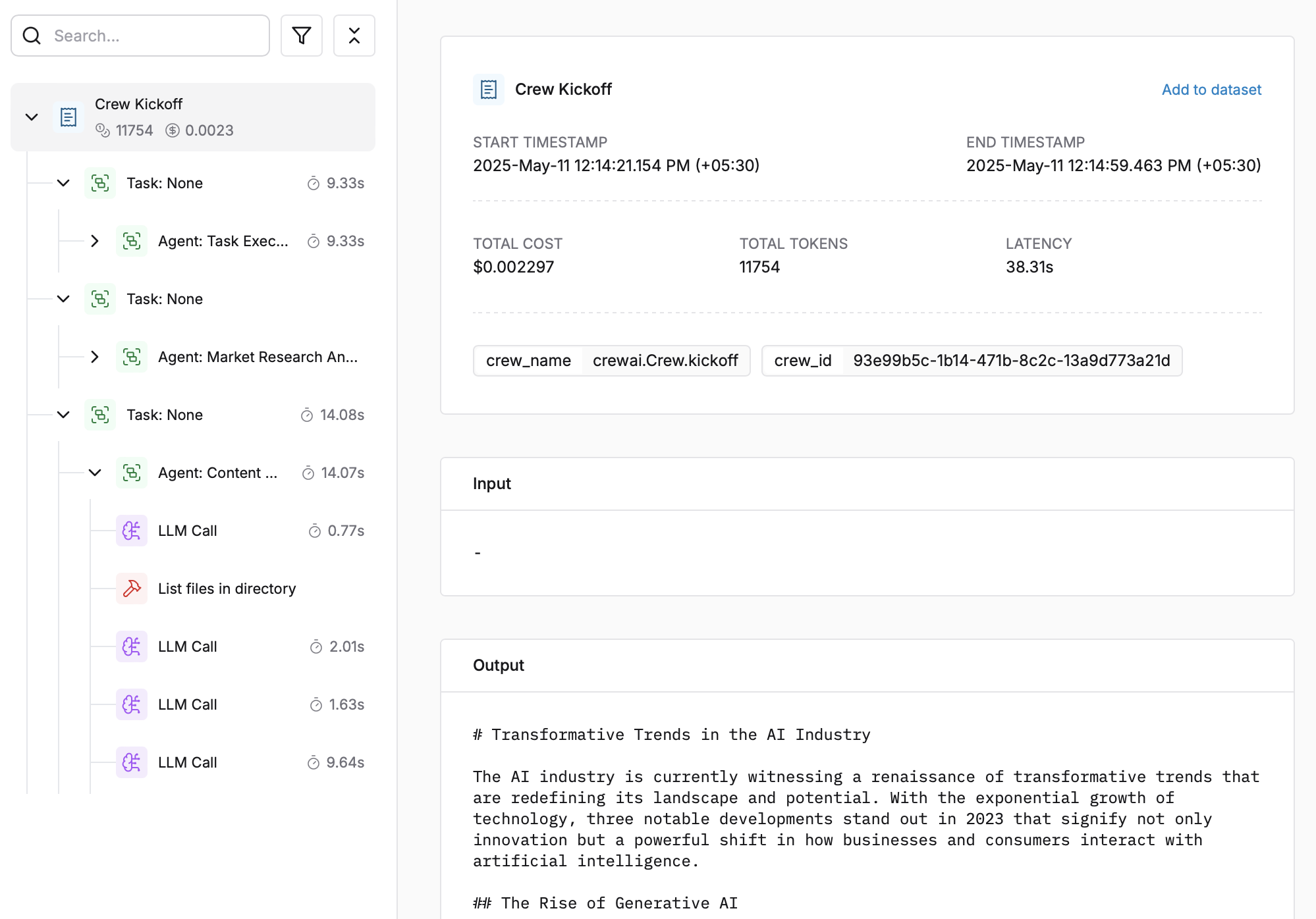
|
||||
|
||||
1. Log in to your [Maxim Dashboard](https://getmaxim.ai/dashboard)
|
||||
2. Navigate to your repository
|
||||
3. View detailed agent traces, including:
|
||||
- Agent conversations
|
||||
- Tool usage patterns
|
||||
- Performance metrics
|
||||
- Cost analytics
|
||||
|
||||
## Troubleshooting
|
||||
|
||||
### Common Issues
|
||||
|
||||
- **No traces appearing**: Ensure your API key and repository ID are correc
|
||||
- Ensure you've **called `instrument_crewai()`** ***before*** running your crew. This initializes logging hooks correctly.
|
||||
- Set `debug=True` in your `instrument_crewai()` call to surface any internal errors:
|
||||
|
||||
```python
|
||||
instrument_crewai(logger, debug=True)
|
||||
```
|
||||
|
||||
- Configure your agents with `verbose=True` to capture detailed logs:
|
||||
|
||||
```python
|
||||
|
||||
agent = CrewAgent(..., verbose=True)
|
||||
```
|
||||
|
||||
- Double-check that `instrument_crewai()` is called **before** creating or executing agents. This might be obvious, but it's a common oversight.
|
||||
|
||||
### Support
|
||||
|
||||
If you encounter any issues:
|
||||
|
||||
- Check the [Maxim Documentation](https://getmaxim.ai/docs)
|
||||
- Maxim Github [Link](https://github.com/maximhq)
|
||||
@@ -11,7 +11,7 @@ dependencies = [
|
||||
# Core Dependencies
|
||||
"pydantic>=2.4.2",
|
||||
"openai>=1.13.3",
|
||||
"litellm==1.68.0",
|
||||
"litellm==1.72.0",
|
||||
"instructor>=1.3.3",
|
||||
# Text Processing
|
||||
"pdfplumber>=0.11.4",
|
||||
|
||||
14
uv.lock
generated
14
uv.lock
generated
@@ -820,7 +820,7 @@ requires-dist = [
|
||||
{ name = "json-repair", specifier = ">=0.25.2" },
|
||||
{ name = "json5", specifier = ">=0.10.0" },
|
||||
{ name = "jsonref", specifier = ">=1.1.0" },
|
||||
{ name = "litellm", specifier = "==1.68.0" },
|
||||
{ name = "litellm", specifier = "==1.72.0" },
|
||||
{ name = "mem0ai", marker = "extra == 'mem0'", specifier = ">=0.1.94" },
|
||||
{ name = "onnxruntime", specifier = "==1.22.0" },
|
||||
{ name = "openai", specifier = ">=1.13.3" },
|
||||
@@ -2245,7 +2245,7 @@ wheels = [
|
||||
|
||||
[[package]]
|
||||
name = "litellm"
|
||||
version = "1.68.0"
|
||||
version = "1.72.0"
|
||||
source = { registry = "https://pypi.org/simple" }
|
||||
dependencies = [
|
||||
{ name = "aiohttp" },
|
||||
@@ -2260,9 +2260,9 @@ dependencies = [
|
||||
{ name = "tiktoken" },
|
||||
{ name = "tokenizers" },
|
||||
]
|
||||
sdist = { url = "https://files.pythonhosted.org/packages/ba/22/138545b646303ca3f4841b69613c697b9d696322a1386083bb70bcbba60b/litellm-1.68.0.tar.gz", hash = "sha256:9fb24643db84dfda339b64bafca505a2eef857477afbc6e98fb56512c24dbbfa", size = 7314051 }
|
||||
sdist = { url = "https://files.pythonhosted.org/packages/55/d3/f1a8c9c9ffdd3bab1bc410254c8140b1346f05a01b8c6b37c48b56abb4b0/litellm-1.72.0.tar.gz", hash = "sha256:135022b9b8798f712ffa84e71ac419aa4310f1d0a70f79dd2007f7ef3a381e43", size = 8082337 }
|
||||
wheels = [
|
||||
{ url = "https://files.pythonhosted.org/packages/10/af/1e344bc8aee41445272e677d802b774b1f8b34bdc3bb5697ba30f0fb5d52/litellm-1.68.0-py3-none-any.whl", hash = "sha256:3bca38848b1a5236b11aa6b70afa4393b60880198c939e582273f51a542d4759", size = 7684460 },
|
||||
{ url = "https://files.pythonhosted.org/packages/c2/98/bec08f5a3e504013db6f52b5fd68375bd92b463c91eb454d5a6460e957af/litellm-1.72.0-py3-none-any.whl", hash = "sha256:88360a7ae9aa9c96278ae1bb0a459226f909e711c5d350781296d0640386a824", size = 7979630 },
|
||||
]
|
||||
|
||||
[[package]]
|
||||
@@ -3123,7 +3123,7 @@ wheels = [
|
||||
|
||||
[[package]]
|
||||
name = "openai"
|
||||
version = "1.68.2"
|
||||
version = "1.78.0"
|
||||
source = { registry = "https://pypi.org/simple" }
|
||||
dependencies = [
|
||||
{ name = "anyio" },
|
||||
@@ -3135,9 +3135,9 @@ dependencies = [
|
||||
{ name = "tqdm" },
|
||||
{ name = "typing-extensions" },
|
||||
]
|
||||
sdist = { url = "https://files.pythonhosted.org/packages/3f/6b/6b002d5d38794645437ae3ddb42083059d556558493408d39a0fcea608bc/openai-1.68.2.tar.gz", hash = "sha256:b720f0a95a1dbe1429c0d9bb62096a0d98057bcda82516f6e8af10284bdd5b19", size = 413429 }
|
||||
sdist = { url = "https://files.pythonhosted.org/packages/d1/7c/7c48bac9be52680e41e99ae7649d5da3a0184cd94081e028897f9005aa03/openai-1.78.0.tar.gz", hash = "sha256:254aef4980688468e96cbddb1f348ed01d274d02c64c6c69b0334bf001fb62b3", size = 442652 }
|
||||
wheels = [
|
||||
{ url = "https://files.pythonhosted.org/packages/fd/34/cebce15f64eb4a3d609a83ac3568d43005cc9a1cba9d7fde5590fd415423/openai-1.68.2-py3-none-any.whl", hash = "sha256:24484cb5c9a33b58576fdc5acf0e5f92603024a4e39d0b99793dfa1eb14c2b36", size = 606073 },
|
||||
{ url = "https://files.pythonhosted.org/packages/cc/41/d64a6c56d0ec886b834caff7a07fc4d43e1987895594b144757e7a6b90d7/openai-1.78.0-py3-none-any.whl", hash = "sha256:1ade6a48cd323ad8a7715e7e1669bb97a17e1a5b8a916644261aaef4bf284778", size = 680407 },
|
||||
]
|
||||
|
||||
[[package]]
|
||||
|
||||
Reference in New Issue
Block a user