
6.9 KiB
Portkey Integration with CrewAI
Portkey is a 2-line upgrade to make your CrewAI agents reliable, cost-efficient, and fast.
Portkey adds 4 core production capabilities to any CrewAI agent:
- Routing to 200+ LLMs
- Making each LLM call more robust
- Full-stack tracing & cost, performance analytics
- Real-time guardrails to enforce behavior
Getting Started
-
Install Required Packages:
pip install crewai portkey-ai langchain_openai -
Configure CrewAI with Portkey:
from langchain_openai import ChatOpenAI
from portkey_ai import createHeaders, PORTKEY_GATEWAY_URL

llm_gpt = ChatOpenAI(
     api_key="OpenAI_API_Key",
     base_url=PORTKEY_GATEWAY_URL,
     default_headers=createHeaders(
         provider="openai", #choose your provider
         api_key="PORTKEY_API_KEY"
     )
 )
Generate your API key in the Portkey Dashboard.
And, that's it! With just this, you can start logging all of your CrewAI requests and make them reliable.
- Let's Run your Crew
from crewai import Agent, Task, Crew, Process

# Define your agents with roles and goals
product_manager = Agent(
    role='Product Manager',
    goal='Define requirements for a software product',
    backstory="You are an experienced Product Manager skilled in defining clear and concise requirements.",
    llm = llm_gpt
)

# Create tasks for your agents
task1 = Task(
    description="Based on the provided requirements, develop the code for the classic ping pong game. Focus on gameplay mechanics and a simple user interface.",
    expected_output="Complete code for the ping pong game",
    agent=coder
)

# Instantiate your crew with a sequential process
crew = Crew(
    agents=[coder],
    tasks=[task1],
    verbose=1,
)

# Get your crew to work!
result = crew.kickoff()
print(result)
Here’s the output from your Agent’s run on Portkey's dashboard

Key Features
Portkey offers a range of advanced features to enhance your CrewAI agents. Here’s an overview
| Feature | Description |
|---|---|
| 🌐 Multi-LLM Integration | Access 200+ LLMs with simple configuration changes |
| 🛡️ Enhanced Reliability | Implement fallbacks, load balancing, retries, and much more |
| 📊 Advanced Metrics | Track costs, tokens, latency, and 40+ custom metrics effortlessly |
| 🔍 Detailed Traces and Logs | Gain insights into every agent action and decision |
| 🚧 Guardrails | Enforce agent behavior with real-time checks on inputs and outputs |
| 🔄 Continuous Optimization | Capture user feedback for ongoing agent improvements |
| 💾 Smart Caching | Reduce costs and latency with built-in caching mechanisms |
| 🔐 Enterprise-Grade Security | Set budget limits and implement fine-grained access controls |
Colab Notebook
For a hands-on example of integrating Portkey with CrewAI, check out our notebook
 .
.
Advanced Features
Interoperability
Easily switch between 200+ LLMs by changing the provider and API key in your configuration.
Example: Switching from OpenAI to Azure OpenAI
config = [
    {
        "api_key": "api-key",
        "model": "gpt-3.5-turbo",
        "base_url": PORTKEY_GATEWAY_URL,
        "api_type": "openai",
        "default_headers": createHeaders(
            api_key="YOUR_PORTKEY_API_KEY",
            provider="azure-openai",
            virtual_key="AZURE_VIRTUAL_KEY"
        )
    }
]
Reliability
Implement fallbacks, load balancing, and automatic retries to make your agents more resilient.
portkey_config = {
  "retry": {
    "attempts": 5
  },
  "strategy": {
    "mode": "loadbalance"  # Options: "loadbalance" or "fallback"
  },
  "targets": [
    {
      "provider": "openai",
      "api_key": "OpenAI_API_Key"
    },
    {
      "provider": "anthropic",
      "api_key": "Anthropic_API_Key"
    }
  ]
}
Metrics
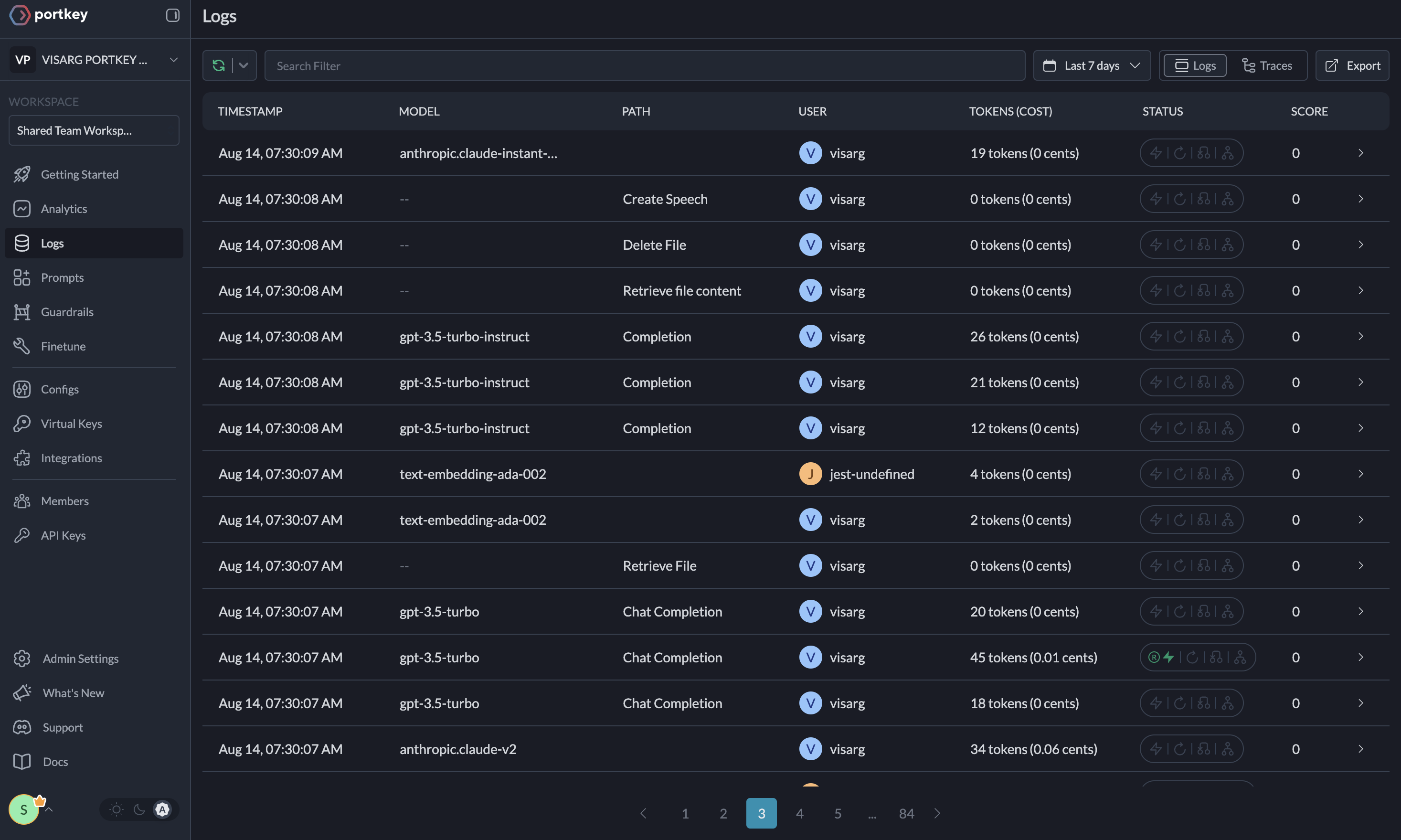
Agent runs are complex. Portkey automatically logs 40+ comprehensive metrics for your AI agents, including cost, tokens used, latency, etc. Whether you need a broad overview or granular insights into your agent runs, Portkey's customizable filters provide the metrics you need.
Portkey's Observability Dashboard
Comprehensive Logging
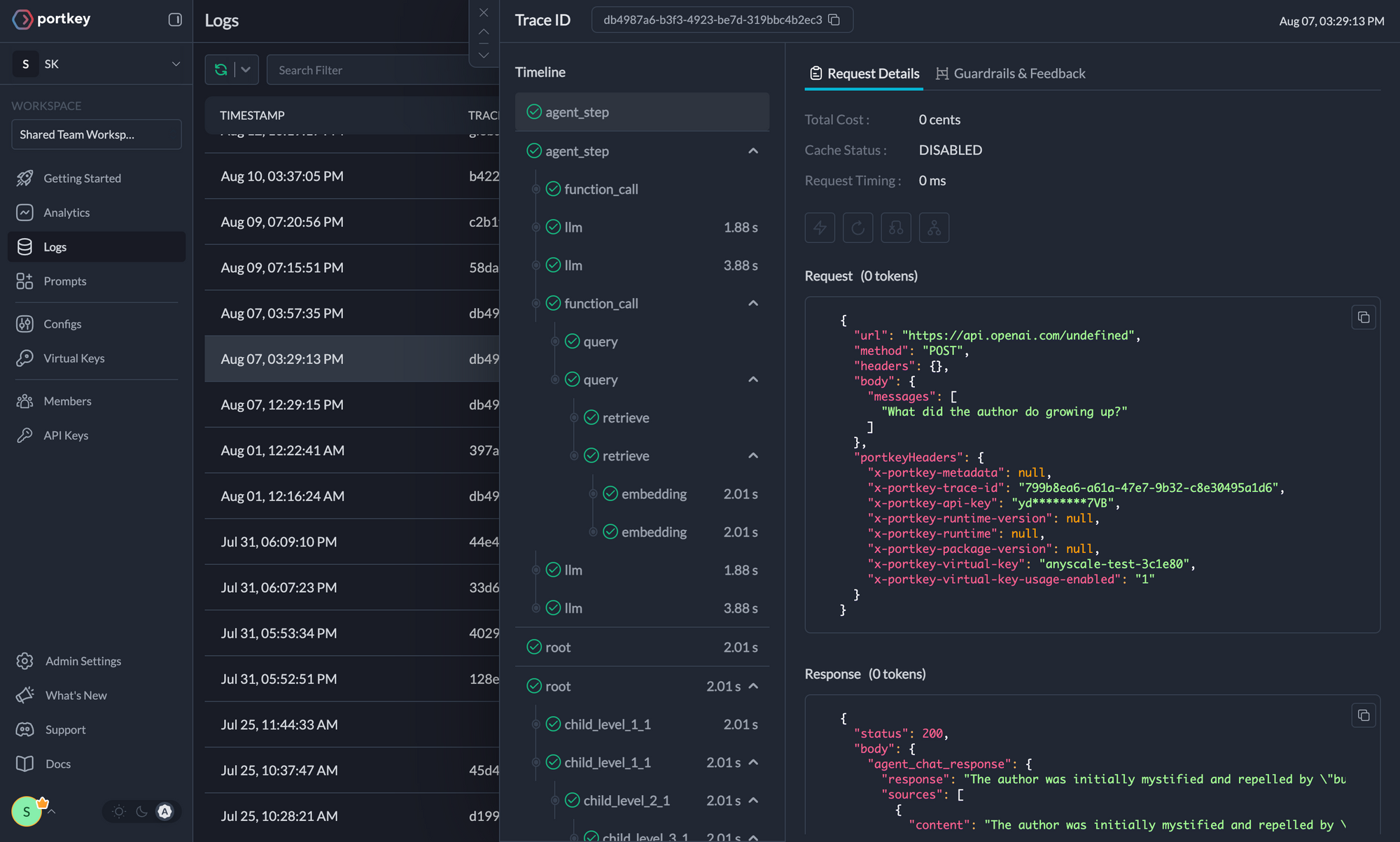
Access detailed logs and traces of agent activities, function calls, and errors. Filter logs based on multiple parameters for in-depth analysis.
Traces
Logs
Guardrails
CrewAI agents, while powerful, can sometimes produce unexpected or undesired outputs. Portkey's Guardrails feature helps enforce agent behavior in real-time, ensuring your CrewAI agents operate within specified parameters. Verify both the inputs to and outputs from your agents to ensure they adhere to specified formats and content guidelines. Learn more about Portkey's Guardrails here
Continuous Improvement
Capture qualitative and quantitative user feedback on your requests to continuously enhance your agent performance.
Caching
Reduce costs and latency with Portkey's built-in caching system.
portkey_config = {
 "cache": {
    "mode": "semantic"  # Options: "simple" or "semantic"
 }
}
Security and Compliance
Set budget limits on provider API keys and implement fine-grained user roles and permissions for both your application and the Portkey APIs.
Additional Resources
For more information on using these features and setting up your Config, please refer to the Portkey documentation.