mirror of
https://github.com/crewAIInc/crewAI.git
synced 2026-01-08 15:48:29 +00:00
 dfc4255f2f
* docs: Fix major memory system documentation issues - Remove misleading deprecation warnings, fix confusing comments, clearly separate three memory approaches, provide accurate examples that match implementation

* fix: Correct broken image paths in README - Update crewai_logo.png and asset.png paths to point to docs/images/ directory instead of docs/ directly

* docs: Add system prompt transparency and customization guide - Add 'Understanding Default System Instructions' section to address black-box concerns - Document what CrewAI automatically injects into prompts - Provide code examples to inspect complete system prompts - Show 3 methods to override default instructions - Include observability integration examples with Langfuse - Add best practices for production prompt management

* docs: Fix implementation accuracy issues in memory documentation - Fix Ollama embedding URL parameter and remove unsupported Cohere input_type parameter

* docs: Reference observability docs instead of showing specific tool examples

* docs: Reorganize knowledge documentation for better developer experience - Move quickstart examples right after overview for immediate hands-on experience - Create logical learning progression: basics → configuration → advanced → troubleshooting - Add comprehensive agent vs crew knowledge guide with working examples - Consolidate debugging and troubleshooting in dedicated section - Organize best practices by topic in accordion format - Improve content flow from simple concepts to advanced features - Ensure all examples are grounded in actual codebase implementation

* docs: enhance custom LLM documentation with comprehensive examples and accurate imports

* docs: reorganize observability tools into dedicated section with comprehensive overview and improved navigation

* docs: rename how-to section to learn and add comprehensive overview page

* docs: finalize documentation reorganization and update navigation labels

* docs: enhance README with comprehensive badges, navigation links, and getting started video
152 lines
6.0 KiB
Plaintext
152 lines
6.0 KiB
Plaintext
---
|
|
title: Arize Phoenix
|
|
description: Arize Phoenix integration for CrewAI with OpenTelemetry and OpenInference
|
|
icon: magnifying-glass-chart
|
|
---
|
|
|
|
# Arize Phoenix Integration
|
|
|
|
This guide demonstrates how to integrate **Arize Phoenix** with **CrewAI** using OpenTelemetry via the [OpenInference](https://github.com/openinference/openinference) SDK. By the end of this guide, you will be able to trace your CrewAI agents and easily debug your agents.
|
|
|
|
> **What is Arize Phoenix?** [Arize Phoenix](https://phoenix.arize.com) is an LLM observability platform that provides tracing and evaluation for AI applications.
|
|
|
|
[](https://www.youtube.com/watch?v=Yc5q3l6F7Ww)
|
|
|
|
## Get Started
|
|
|
|
We'll walk through a simple example of using CrewAI and integrating it with Arize Phoenix via OpenTelemetry using OpenInference.
|
|
|
|
You can also access this guide on [Google Colab](https://colab.research.google.com/github/Arize-ai/phoenix/blob/main/tutorials/tracing/crewai_tracing_tutorial.ipynb).
|
|
|
|
### Step 1: Install Dependencies
|
|
|
|
```bash
|
|
pip install openinference-instrumentation-crewai crewai crewai-tools arize-phoenix-otel
|
|
```
|
|
|
|
### Step 2: Set Up Environment Variables
|
|
|
|
Setup Phoenix Cloud API keys and configure OpenTelemetry to send traces to Phoenix. Phoenix Cloud is a hosted version of Arize Phoenix, but it is not required to use this integration.
|
|
|
|
You can get your free Serper API key [here](https://serper.dev/).
|
|
|
|
```python
|
|
import os
|
|
from getpass import getpass
|
|
|
|
# Get your Phoenix Cloud credentials
|
|
PHOENIX_API_KEY = getpass("🔑 Enter your Phoenix Cloud API Key: ")
|
|
|
|
# Get API keys for services
|
|
OPENAI_API_KEY = getpass("🔑 Enter your OpenAI API key: ")
|
|
SERPER_API_KEY = getpass("🔑 Enter your Serper API key: ")
|
|
|
|
# Set environment variables
|
|
os.environ["PHOENIX_CLIENT_HEADERS"] = f"api_key={PHOENIX_API_KEY}"
|
|
os.environ["PHOENIX_COLLECTOR_ENDPOINT"] = "https://app.phoenix.arize.com" # Phoenix Cloud, change this to your own endpoint if you are using a self-hosted instance
|
|
os.environ["OPENAI_API_KEY"] = OPENAI_API_KEY
|
|
os.environ["SERPER_API_KEY"] = SERPER_API_KEY
|
|
```
|
|
|
|
### Step 3: Initialize OpenTelemetry with Phoenix
|
|
|
|
Initialize the OpenInference OpenTelemetry instrumentation SDK to start capturing traces and send them to Phoenix.
|
|
|
|
```python
|
|
from phoenix.otel import register
|
|
|
|
tracer_provider = register(
|
|
project_name="crewai-tracing-demo",
|
|
auto_instrument=True,
|
|
)
|
|
```
|
|
|
|
### Step 4: Create a CrewAI Application
|
|
|
|
We'll create a CrewAI application where two agents collaborate to research and write a blog post about AI advancements.
|
|
|
|
```python
|
|
from crewai import Agent, Crew, Process, Task
|
|
from crewai_tools import SerperDevTool
|
|
from openinference.instrumentation.crewai import CrewAIInstrumentor
|
|
from phoenix.otel import register
|
|
|
|
# setup monitoring for your crew
|
|
tracer_provider = register(
|
|
endpoint="http://localhost:6006/v1/traces")
|
|
CrewAIInstrumentor().instrument(skip_dep_check=True, tracer_provider=tracer_provider)
|
|
search_tool = SerperDevTool()
|
|
|
|
# Define your agents with roles and goals
|
|
researcher = Agent(
|
|
role="Senior Research Analyst",
|
|
goal="Uncover cutting-edge developments in AI and data science",
|
|
backstory="""You work at a leading tech think tank.
|
|
Your expertise lies in identifying emerging trends.
|
|
You have a knack for dissecting complex data and presenting actionable insights.""",
|
|
verbose=True,
|
|
allow_delegation=False,
|
|
# You can pass an optional llm attribute specifying what model you wanna use.
|
|
# llm=ChatOpenAI(model_name="gpt-3.5", temperature=0.7),
|
|
tools=[search_tool],
|
|
)
|
|
writer = Agent(
|
|
role="Tech Content Strategist",
|
|
goal="Craft compelling content on tech advancements",
|
|
backstory="""You are a renowned Content Strategist, known for your insightful and engaging articles.
|
|
You transform complex concepts into compelling narratives.""",
|
|
verbose=True,
|
|
allow_delegation=True,
|
|
)
|
|
|
|
# Create tasks for your agents
|
|
task1 = Task(
|
|
description="""Conduct a comprehensive analysis of the latest advancements in AI in 2024.
|
|
Identify key trends, breakthrough technologies, and potential industry impacts.""",
|
|
expected_output="Full analysis report in bullet points",
|
|
agent=researcher,
|
|
)
|
|
|
|
task2 = Task(
|
|
description="""Using the insights provided, develop an engaging blog
|
|
post that highlights the most significant AI advancements.
|
|
Your post should be informative yet accessible, catering to a tech-savvy audience.
|
|
Make it sound cool, avoid complex words so it doesn't sound like AI.""",
|
|
expected_output="Full blog post of at least 4 paragraphs",
|
|
agent=writer,
|
|
)
|
|
|
|
# Instantiate your crew with a sequential process
|
|
crew = Crew(
|
|
agents=[researcher, writer], tasks=[task1, task2], verbose=1, process=Process.sequential
|
|
)
|
|
|
|
# Get your crew to work!
|
|
result = crew.kickoff()
|
|
|
|
print("######################")
|
|
print(result)
|
|
```
|
|
|
|
### Step 5: View Traces in Phoenix
|
|
|
|
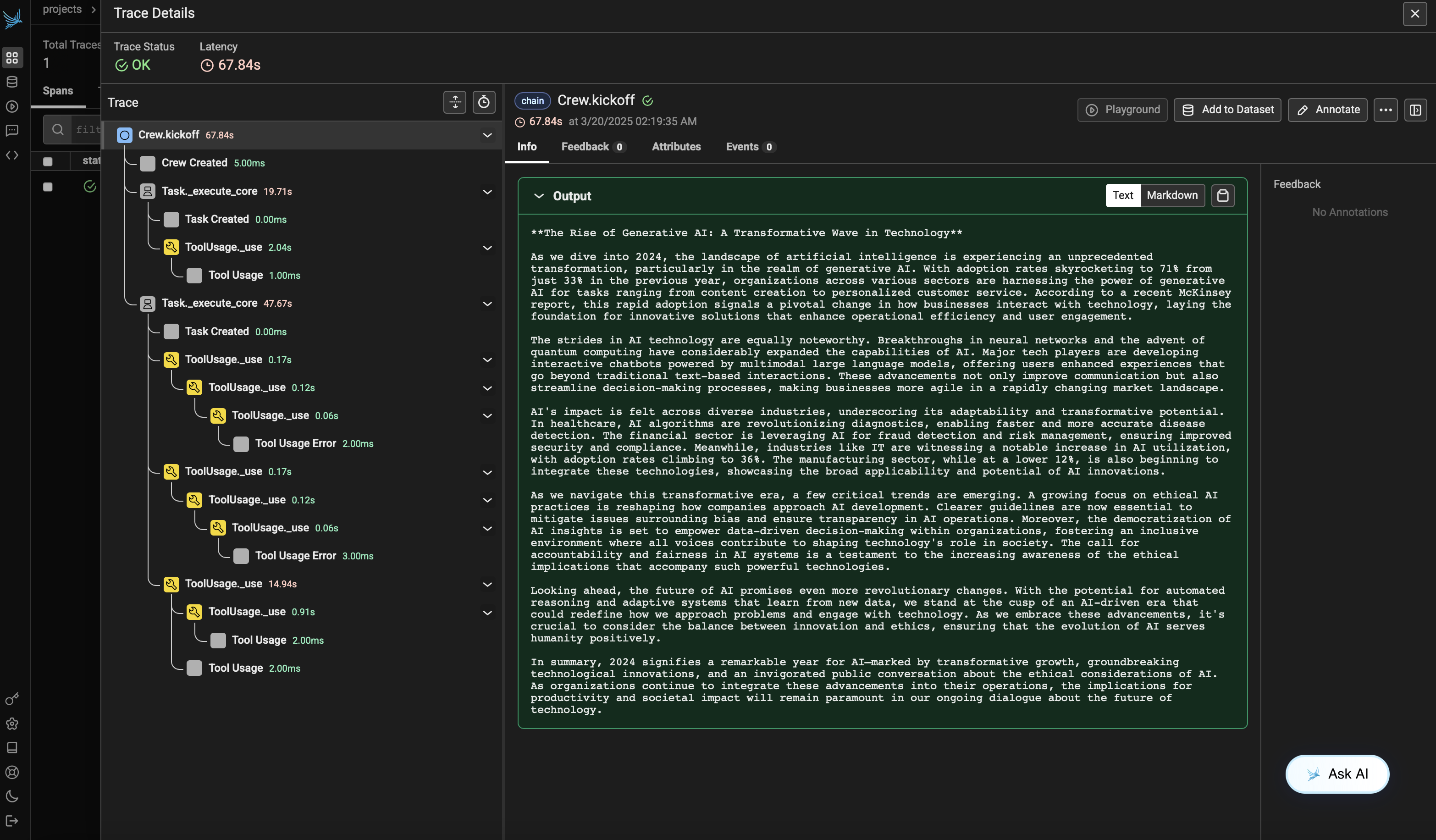
After running the agent, you can view the traces generated by your CrewAI application in Phoenix. You should see detailed steps of the agent interactions and LLM calls, which can help you debug and optimize your AI agents.
|
|
|
|
Log into your Phoenix Cloud account and navigate to the project you specified in the `project_name` parameter. You'll see a timeline view of your trace with all the agent interactions, tool usages, and LLM calls.
|
|
|
|
|
|
|
|
|
|
### Version Compatibility Information
|
|
- Python 3.8+
|
|
- CrewAI >= 0.86.0
|
|
- Arize Phoenix >= 7.0.1
|
|
- OpenTelemetry SDK >= 1.31.0
|
|
|
|
|
|
### References
|
|
- [Phoenix Documentation](https://docs.arize.com/phoenix/) - Overview of the Phoenix platform.
|
|
- [CrewAI Documentation](https://docs.crewai.com/) - Overview of the CrewAI framework.
|
|
- [OpenTelemetry Docs](https://opentelemetry.io/docs/) - OpenTelemetry guide
|
|
- [OpenInference GitHub](https://github.com/openinference/openinference) - Source code for OpenInference SDK.
|