mirror of
https://github.com/crewAIInc/crewAI.git
synced 2026-01-08 07:38:29 +00:00
 dfc4255f2f
* docs: Fix major memory system documentation issues - Remove misleading deprecation warnings, fix confusing comments, clearly separate three memory approaches, provide accurate examples that match implementation

* fix: Correct broken image paths in README - Update crewai_logo.png and asset.png paths to point to docs/images/ directory instead of docs/ directly

* docs: Add system prompt transparency and customization guide - Add 'Understanding Default System Instructions' section to address black-box concerns - Document what CrewAI automatically injects into prompts - Provide code examples to inspect complete system prompts - Show 3 methods to override default instructions - Include observability integration examples with Langfuse - Add best practices for production prompt management

* docs: Fix implementation accuracy issues in memory documentation - Fix Ollama embedding URL parameter and remove unsupported Cohere input_type parameter

* docs: Reference observability docs instead of showing specific tool examples

* docs: Reorganize knowledge documentation for better developer experience - Move quickstart examples right after overview for immediate hands-on experience - Create logical learning progression: basics → configuration → advanced → troubleshooting - Add comprehensive agent vs crew knowledge guide with working examples - Consolidate debugging and troubleshooting in dedicated section - Organize best practices by topic in accordion format - Improve content flow from simple concepts to advanced features - Ensure all examples are grounded in actual codebase implementation

* docs: enhance custom LLM documentation with comprehensive examples and accurate imports

* docs: reorganize observability tools into dedicated section with comprehensive overview and improved navigation

* docs: rename how-to section to learn and add comprehensive overview page

* docs: finalize documentation reorganization and update navigation labels

* docs: enhance README with comprehensive badges, navigation links, and getting started video
101 lines
3.6 KiB
Plaintext
101 lines
3.6 KiB
Plaintext
---
|
|
title: Langfuse Integration
|
|
description: Learn how to integrate Langfuse with CrewAI via OpenTelemetry using OpenLit
|
|
icon: vials
|
|
---
|
|
|
|
# Integrate Langfuse with CrewAI
|
|
|
|
This notebook demonstrates how to integrate **Langfuse** with **CrewAI** using OpenTelemetry via the **OpenLit** SDK. By the end of this notebook, you will be able to trace your CrewAI applications with Langfuse for improved observability and debugging.
|
|
|
|
> **What is Langfuse?** [Langfuse](https://langfuse.com) is an open-source LLM engineering platform. It provides tracing and monitoring capabilities for LLM applications, helping developers debug, analyze, and optimize their AI systems. Langfuse integrates with various tools and frameworks via native integrations, OpenTelemetry, and APIs/SDKs.
|
|
|
|
[](https://langfuse.com/watch-demo)
|
|
|
|
## Get Started
|
|
|
|
We'll walk through a simple example of using CrewAI and integrating it with Langfuse via OpenTelemetry using OpenLit.
|
|
|
|
### Step 1: Install Dependencies
|
|
|
|
|
|
```python
|
|
%pip install langfuse openlit crewai crewai_tools
|
|
```
|
|
|
|
### Step 2: Set Up Environment Variables
|
|
|
|
Set your Langfuse API keys and configure OpenTelemetry export settings to send traces to Langfuse. Please refer to the [Langfuse OpenTelemetry Docs](https://langfuse.com/docs/opentelemetry/get-started) for more information on the Langfuse OpenTelemetry endpoint `/api/public/otel` and authentication.
|
|
|
|
|
|
```python
|
|
import os
|
|
import base64
|
|
|
|
LANGFUSE_PUBLIC_KEY="pk-lf-..."
|
|
LANGFUSE_SECRET_KEY="sk-lf-..."
|
|
LANGFUSE_AUTH=base64.b64encode(f"{LANGFUSE_PUBLIC_KEY}:{LANGFUSE_SECRET_KEY}".encode()).decode()
|
|
|
|
os.environ["OTEL_EXPORTER_OTLP_ENDPOINT"] = "https://cloud.langfuse.com/api/public/otel" # EU data region
|
|
# os.environ["OTEL_EXPORTER_OTLP_ENDPOINT"] = "https://us.cloud.langfuse.com/api/public/otel" # US data region
|
|
os.environ["OTEL_EXPORTER_OTLP_HEADERS"] = f"Authorization=Basic {LANGFUSE_AUTH}"
|
|
|
|
# your openai key
|
|
os.environ["OPENAI_API_KEY"] = "sk-..."
|
|
```
|
|
|
|
### Step 3: Initialize OpenLit
|
|
|
|
Initialize the OpenLit OpenTelemetry instrumentation SDK to start capturing OpenTelemetry traces.
|
|
|
|
|
|
```python
|
|
import openlit
|
|
|
|
openlit.init()
|
|
```
|
|
|
|
### Step 4: Create a Simple CrewAI Application
|
|
|
|
We'll create a simple CrewAI application where multiple agents collaborate to answer a user's question.
|
|
|
|
|
|
```python
|
|
from crewai import Agent, Task, Crew
|
|
|
|
from crewai_tools import (
|
|
WebsiteSearchTool
|
|
)
|
|
|
|
web_rag_tool = WebsiteSearchTool()
|
|
|
|
writer = Agent(
|
|
role="Writer",
|
|
goal="You make math engaging and understandable for young children through poetry",
|
|
backstory="You're an expert in writing haikus but you know nothing of math.",
|
|
tools=[web_rag_tool],
|
|
)
|
|
|
|
task = Task(description=("What is {multiplication}?"),
|
|
expected_output=("Compose a haiku that includes the answer."),
|
|
agent=writer)
|
|
|
|
crew = Crew(
|
|
agents=[writer],
|
|
tasks=[task],
|
|
share_crew=False
|
|
)
|
|
```
|
|
|
|
### Step 5: See Traces in Langfuse
|
|
|
|
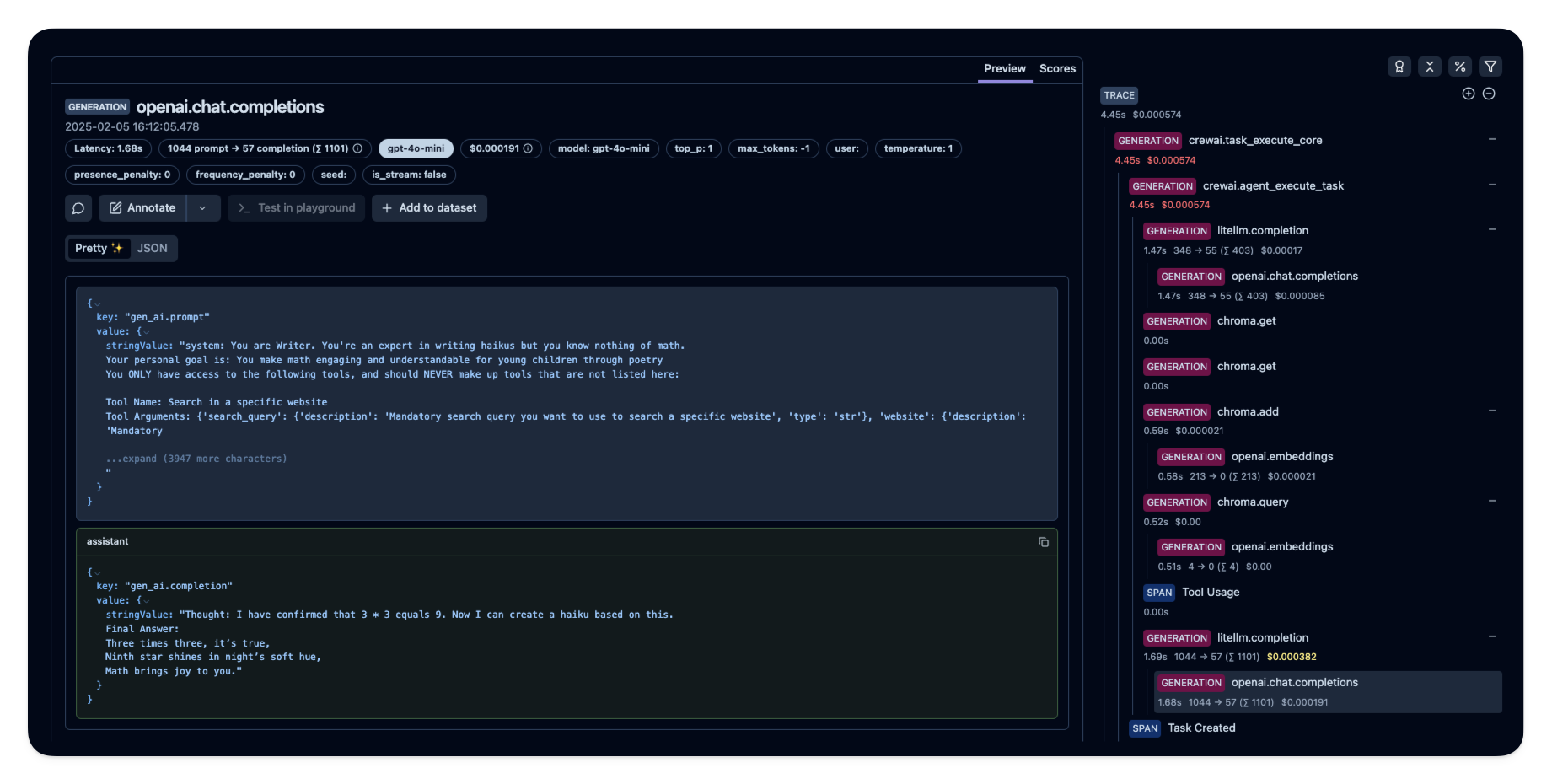
After running the agent, you can view the traces generated by your CrewAI application in [Langfuse](https://cloud.langfuse.com). You should see detailed steps of the LLM interactions, which can help you debug and optimize your AI agent.
|
|
|
|
|
|
|
|
_[Public example trace in Langfuse](https://cloud.langfuse.com/project/cloramnkj0002jz088vzn1ja4/traces/e2cf380ffc8d47d28da98f136140642b?timestamp=2025-02-05T15%3A12%3A02.717Z&observation=3b32338ee6a5d9af)_
|
|
|
|
## References
|
|
|
|
- [Langfuse OpenTelemetry Docs](https://langfuse.com/docs/opentelemetry/get-started)
|